> For the complete documentation index, see [llms.txt](https://athome-1.gitbook.io/athome-docs/llms.txt). Markdown versions of documentation pages are available by appending `.md` to page URLs; this page is available as [Markdown](https://athome-1.gitbook.io/athome-docs/welcome-to-glpi-12/shortcuts.md).
# Shortcuts
Keyboard shortcuts are available to navigate between modules/sub-modules. Here is the list of these shortcuts:
{% columns %}
{% column valign="middle" %}
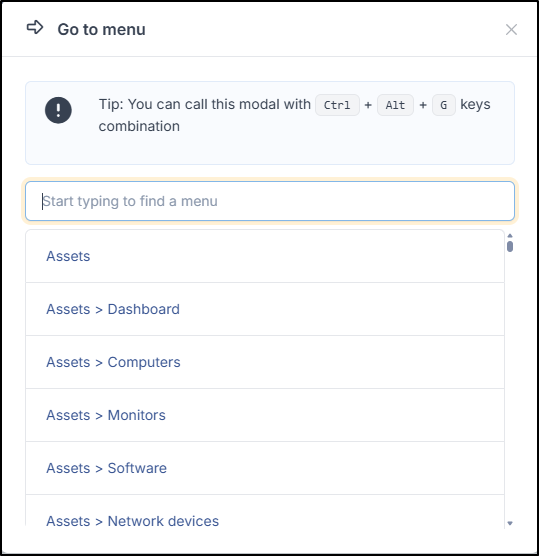
Navigation "Fuzzy" for Windows
{% endcolumn %}
{% column %}
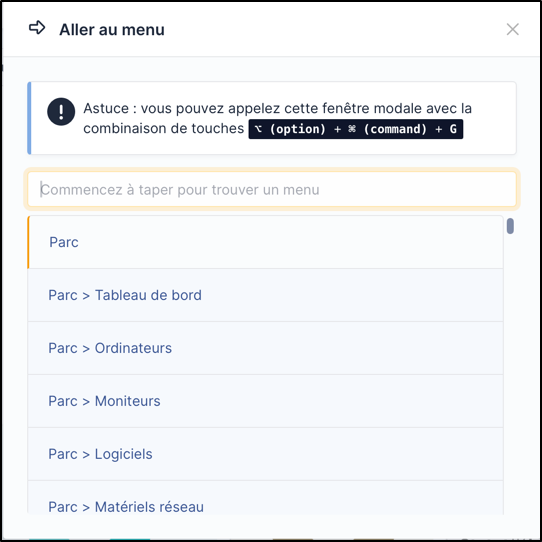
Navigation "Fuzzy" for MAC
{% endcolumn %}
{% endcolumns %}
* `1` => Home
* *Inventory*
> * `o` => Computers
> * `s` => Software
* *Helpdesk*
> * `t` => Tickets
> * `a` => Statistics
> * `p` => Planning
* *Management*
> * `d` => Documents
* Tools
> * `b` => Knowledge Base
> * `r` => Reservations
> * `e` => Reports
* Administration
> * `u` => Users
> * `g` => Groups
* Setup
> * `n` => Dropdown lists
> * `g` => Groups
{% hint style="info" %}
The key combination to associate with these shortcuts varies depending on the operating systems and browsers used. Here are some examples based on browsers:
* Mozilla Firefox / Chrome
> Press the `Alt`, `Shift`, and *the desired shortcut* keys simultaneously.
* Opera
> Press the `Esc`, `Shift`, and *the desired shortcut* keys simultaneously.
> {% endhint %}
Additionally, GLPI offers fuzzy search navigation accessible via the keyboard shortcut `Ctrl` + `Alt` + `G` (or :option: (option)+ :command: (command)+ G for MAC). This will open a modal window allowing you to filter all GLPI menus via a search field (all levels are present, for example, you have access to the 3rd level such as dropdown lists or components).
Within this window, additional shortcuts are available:
* `↑` and `↓` to navigate through the results
* `Enter` to change the active GLPI page to the selected result
* `Esc` to close the window.