> For the complete documentation index, see [llms.txt](https://athome-1.gitbook.io/athome-docs/llms.txt). Markdown versions of documentation pages are available by appending `.md` to page URLs; this page is available as [Markdown](https://athome-1.gitbook.io/athome-docs/tools/tabs/kanban.md).

# Kanban

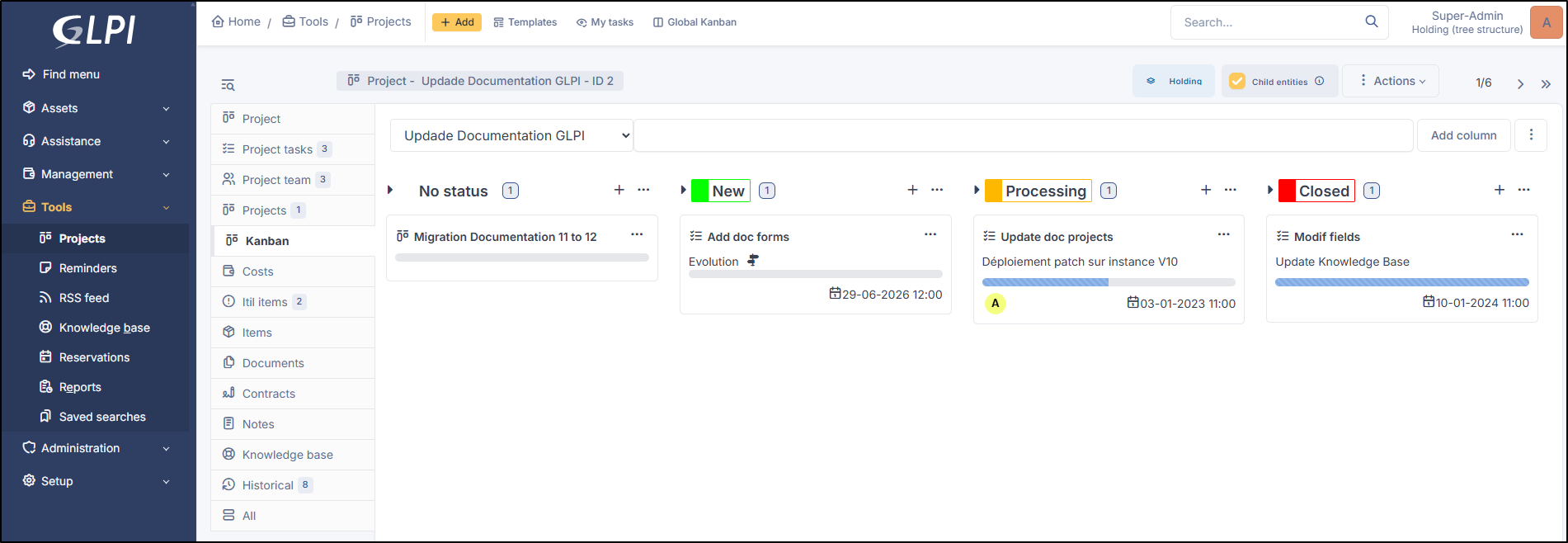
Kanban allows you to visualize all project tasks in a status-based view.

<figure><img src="https://2965217165-files.gitbook.io/~/files/v0/b/gitbook-x-prod.appspot.com/o/spaces%2FBk8u0TPogHtiUd7DaQyf%2Fuploads%2Fgit-blob-f6349c15bbd8e43180a59b1574337f24ed05481a%2Fkanban.png?alt=media" alt=""><figcaption><p>Kanban view</p></figcaption></figure>

***

## Add a view

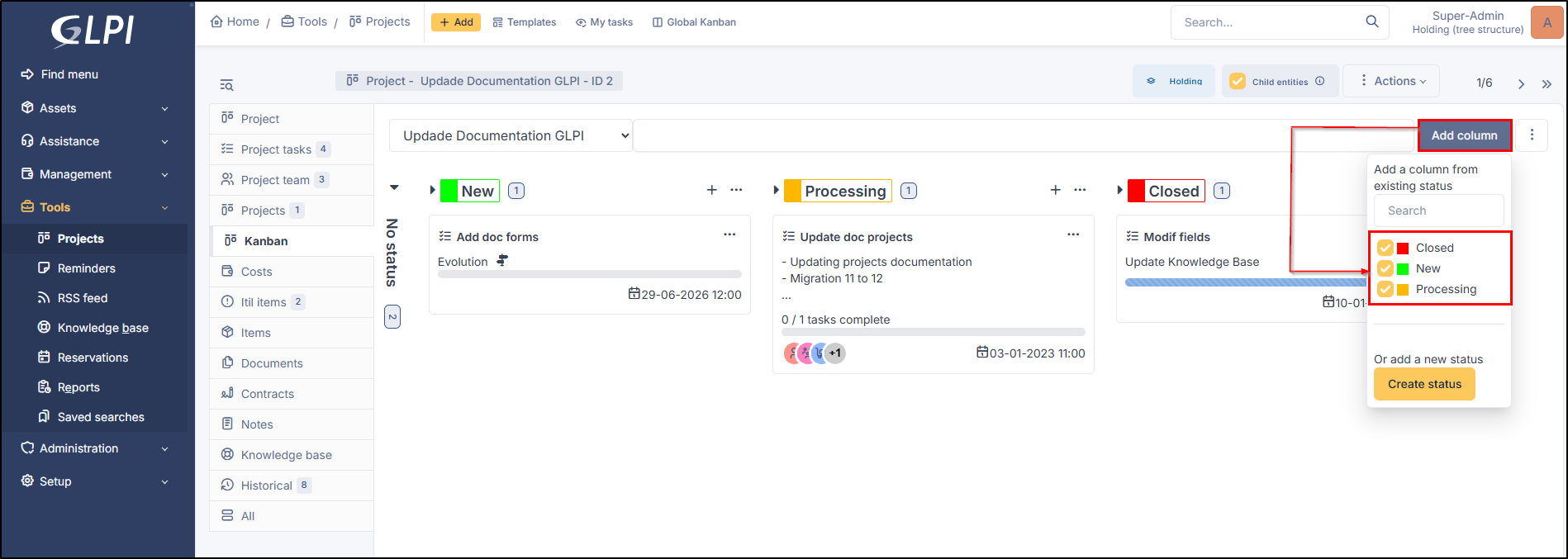
* To add a Kanban view, go to the Kanban tab
* Click on **`Add column`**
* Select the statuses you need

<figure><img src="https://2965217165-files.gitbook.io/~/files/v0/b/gitbook-x-prod.appspot.com/o/spaces%2FBk8u0TPogHtiUd7DaQyf%2Fuploads%2Fgit-blob-05f997520fc13d183b35d4e9bf4fefd7a1314d1a%2Fkanban-add-status.png?alt=media" alt=""><figcaption><p>Add status to the view</p></figcaption></figure>

***

## Add a new status

There are two ways to create a new status

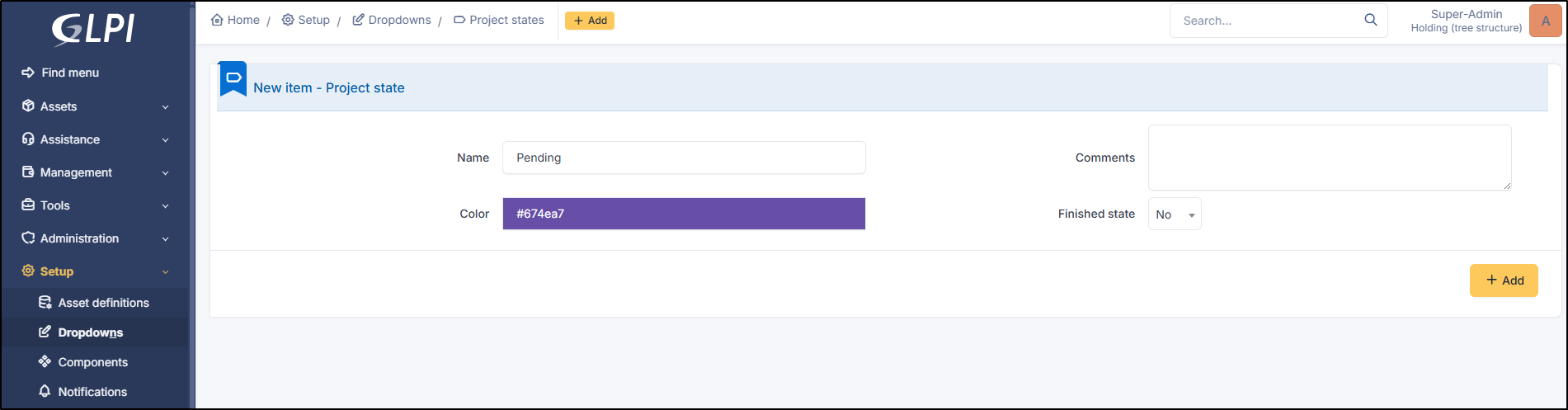
* From **`Setup`** > **`Dropdowns`** > **`Project states`**
* Click on **`+ Add`**
* Enter the
  * Name
  * Comments
  * Color
  * Finished state

<figure><img src="https://2965217165-files.gitbook.io/~/files/v0/b/gitbook-x-prod.appspot.com/o/spaces%2FBk8u0TPogHtiUd7DaQyf%2Fuploads%2Fgit-blob-b02da60f6cf4d79678619d20202687943fb87287%2Fadd-pending-status.png?alt=media" alt=""><figcaption><p>Create new status</p></figcaption></figure>

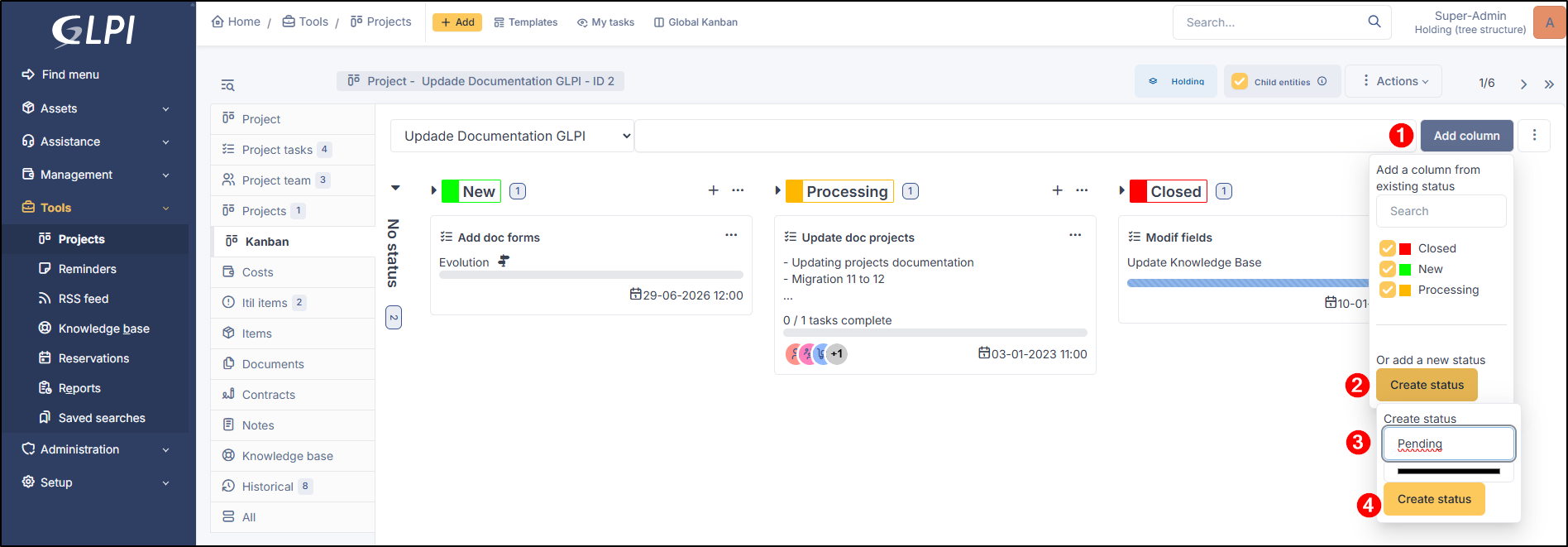
The second method is to use Kanban directly

* Click on **`Add columns`**
* Then **`Create status`**
* Enter the **`name of the status`**
* Click on **`Create status`**

<figure><img src="https://2965217165-files.gitbook.io/~/files/v0/b/gitbook-x-prod.appspot.com/o/spaces%2FBk8u0TPogHtiUd7DaQyf%2Fuploads%2Fgit-blob-182229a99050536d6a51a9b565be3f70b15e2fbb%2Fadd-new-status-kanban.png?alt=media" alt=""><figcaption><p>Create new status</p></figcaption></figure>

***

## Details and options

### View details

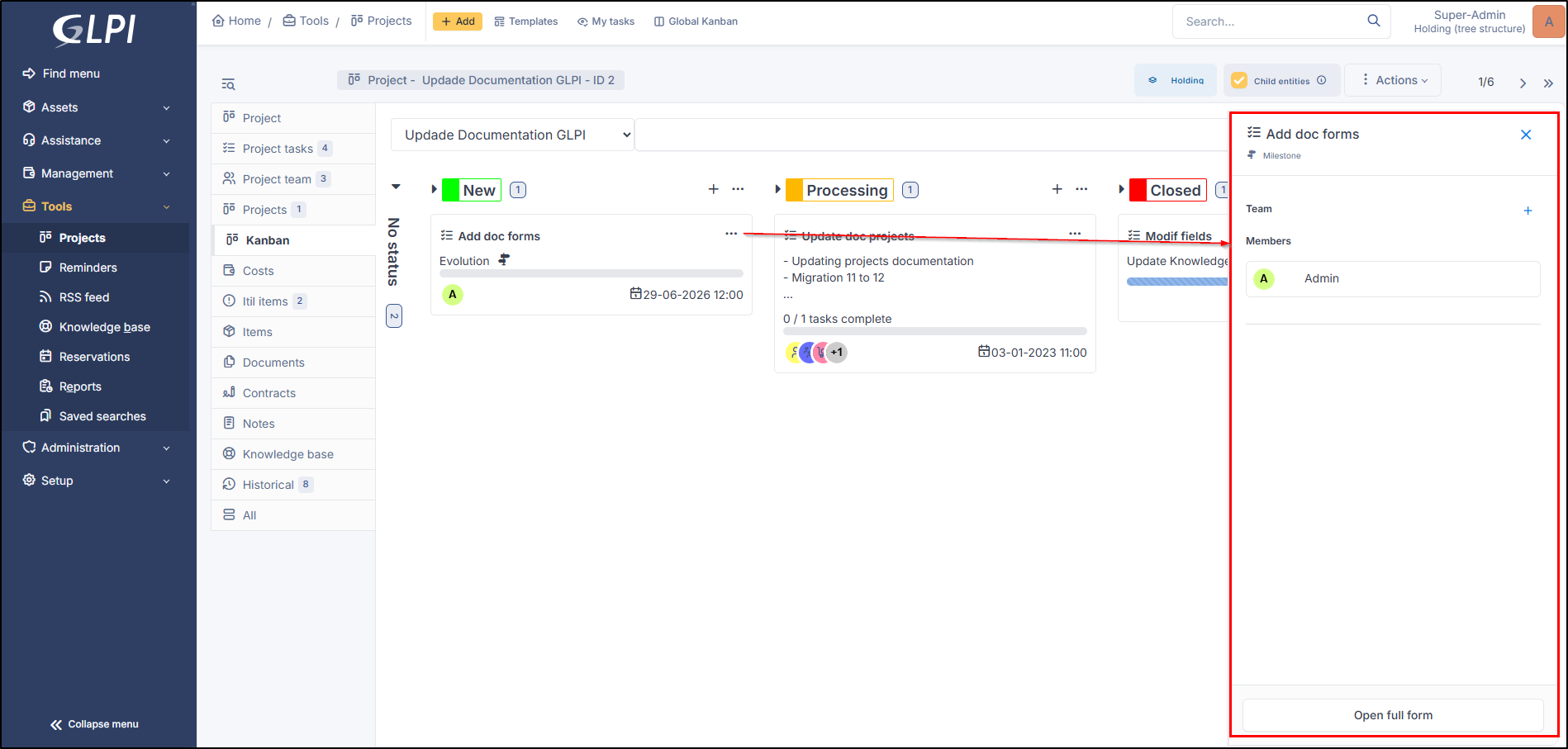
By clicking on one of the tiles, you can view some details of the project task.

<figure><img src="https://2965217165-files.gitbook.io/~/files/v0/b/gitbook-x-prod.appspot.com/o/spaces%2FBk8u0TPogHtiUd7DaQyf%2Fuploads%2Fgit-blob-1714cc81ef4d6cefc0a78328172787a7105088b4%2Fdetails-kanban.png?alt=media" alt=""><figcaption><p>View details</p></figcaption></figure>

### Access to the task project

By clicking on the icon <i class="fa-list-check">:list-check:</i>, you will access the project task directly.

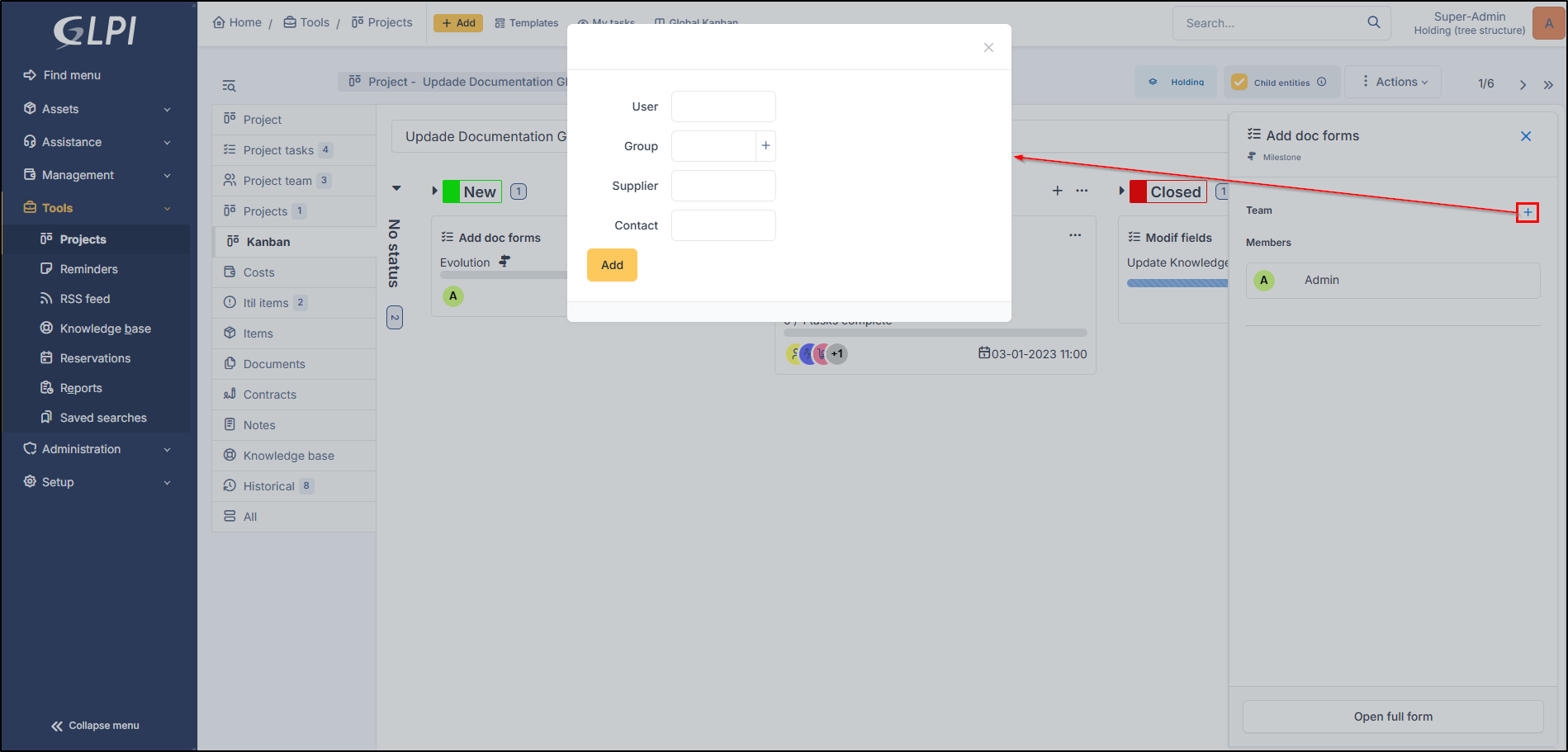
### Add member

You can add member directly form this screen

<figure><img src="https://2965217165-files.gitbook.io/~/files/v0/b/gitbook-x-prod.appspot.com/o/spaces%2FBk8u0TPogHtiUd7DaQyf%2Fuploads%2Fgit-blob-e927862d44d7da3ed39f61a8dee6014526a365c0%2Fadd-member.png?alt=media" alt=""><figcaption><p>Add members</p></figcaption></figure>

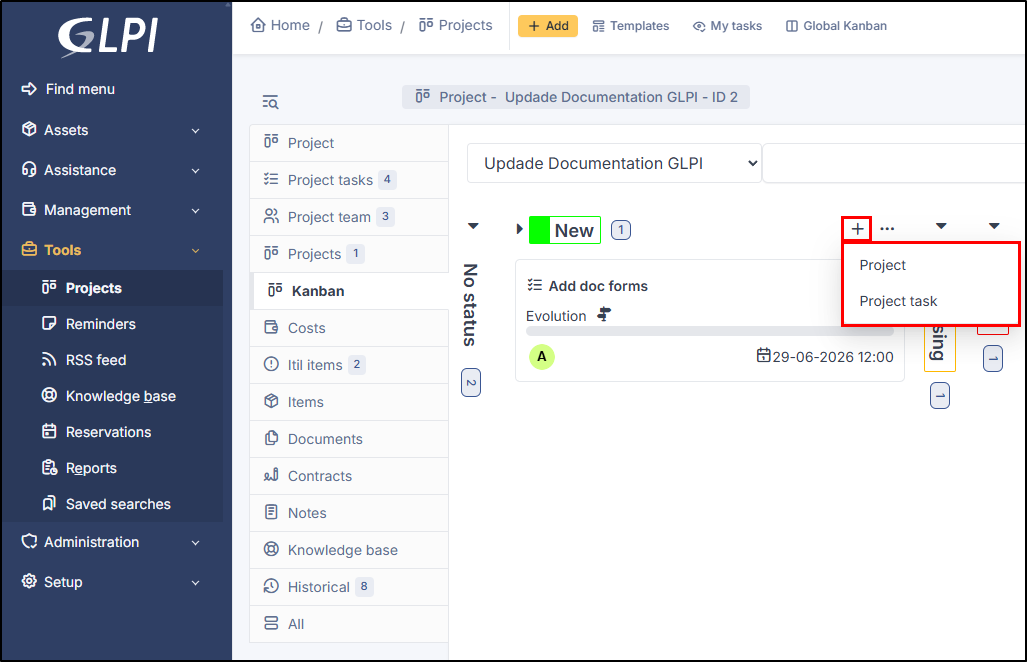
### Add project of task project

By clicking on <i class="fa-plus-large">:plus-large:</i>, you can add a project or a task project.

<figure><img src="https://2965217165-files.gitbook.io/~/files/v0/b/gitbook-x-prod.appspot.com/o/spaces%2FBk8u0TPogHtiUd7DaQyf%2Fuploads%2Fgit-blob-c5a17e0da728a0a6c1179a1438db1325e54b362e%2Fadd-project.png?alt=media" alt=""><figcaption><p>Add a project or task project</p></figcaption></figure>

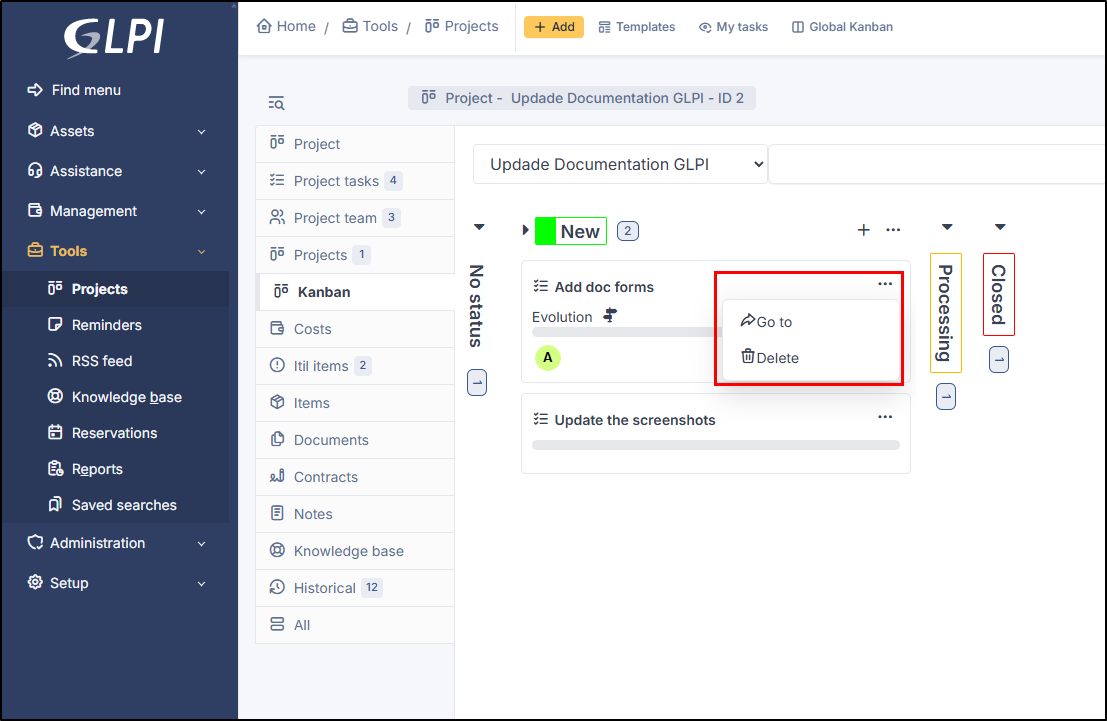
### Go to or delete

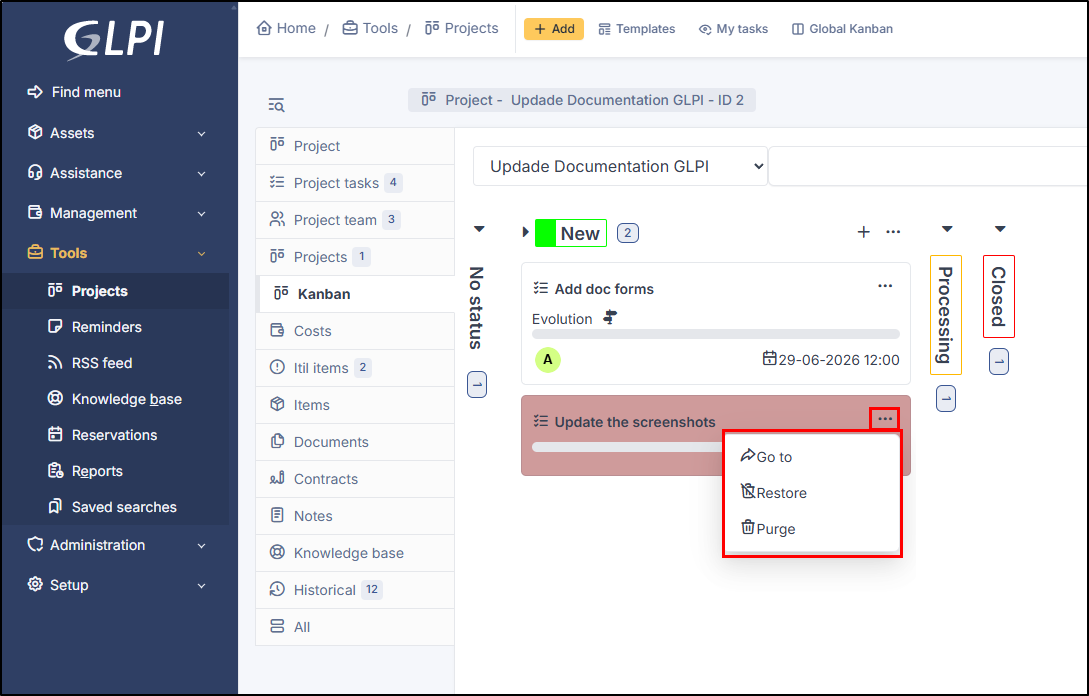
From the project task tile, you can either go to the project task page or delete the task. After deletion, the task will remain visible but appear against a red background; you can then choose to restore it or delete it permanently.

<figure><img src="https://2965217165-files.gitbook.io/~/files/v0/b/gitbook-x-prod.appspot.com/o/spaces%2FBk8u0TPogHtiUd7DaQyf%2Fuploads%2Fgit-blob-f9b3365626b2866e384f20593167ee2b52bc585d%2Fgo-to-project.png?alt=media" alt=""><figcaption></figcaption></figure>

### Purge or restore

When a project task is marked as deleted, you can restore it or permanently delete it by clicking on <i class="fa-ellipsis">:ellipsis:</i>

<figure><img src="https://2965217165-files.gitbook.io/~/files/v0/b/gitbook-x-prod.appspot.com/o/spaces%2FBk8u0TPogHtiUd7DaQyf%2Fuploads%2Fgit-blob-18cdc08146b165a59d403a5a9ea8d35c86bb963a%2Fpurge-restore.png?alt=media" alt=""><figcaption></figcaption></figure>