> For the complete documentation index, see [llms.txt](https://athome-1.gitbook.io/athome-docs/llms.txt). Markdown versions of documentation pages are available by appending `.md` to page URLs; this page is available as [Markdown](https://athome-1.gitbook.io/athome-docs/assistance/tabs/task.md).

# Task

A task is a unit of work describing an action to be performed, by whom, and when. They are used to accurately track the progress of a request or intervention.

Tasks allow you to break down a ticket, change, or project into several traceable actions, ensuring better distribution of work and optimal follow-up.

## Main characteristics

* **Link to an object**: tasks are generally linked to a ticket, but can also be linked to an issue, a change, or a project.
* **Description**: free field to detail what needs to be done.
* **Assignment**: a task can be assigned to a technician, a group, or left unassigned.
* **Scheduling**: you can specify a planned start and end date/time.
* **Status**: allows you to track whether the task is pending, in progress or completed.
* **Time spent** (optional): allows you to record the time actually spent on the task.
* **Notifications**: allows to send notifications when new tasks are created or modified.

<figure><img src="https://2965217165-files.gitbook.io/~/files/v0/b/gitbook-x-prod.appspot.com/o/spaces%2FBk8u0TPogHtiUd7DaQyf%2Fuploads%2Fgit-blob-368271c04a6539a4db87b569b965273263d52d63%2Fimage%20(14).png?alt=media" alt=""><figcaption><p>View task</p></figcaption></figure>

## Description of each field

<table><thead><tr><th width="172" data-type="image">Icon</th><th>Explanation</th></tr></thead><tbody><tr><td><a href="https://2965217165-files.gitbook.io/~/files/v0/b/gitbook-x-prod.appspot.com/o/spaces%2FBk8u0TPogHtiUd7DaQyf%2Fuploads%2Fgit-blob-030194fee103ad47b1c91d9f2468fe10887708b2%2Ffollowup_template.svg?alt=media">followup_template.svg</a></td><td>Use a template if one exists (see <a href="#task-template">task template</a> for more information)</td></tr><tr><td><a href="https://2965217165-files.gitbook.io/~/files/v0/b/gitbook-x-prod.appspot.com/o/spaces%2FBk8u0TPogHtiUd7DaQyf%2Fuploads%2Fgit-blob-1ef0e02176eb22988fe1787f8a9203183135ff09%2Fdate_task.svg?alt=media">date_task.svg</a></td><td>Schedule the task (day/month/year and time)</td></tr><tr><td><a href="https://2965217165-files.gitbook.io/~/files/v0/b/gitbook-x-prod.appspot.com/o/spaces%2FBk8u0TPogHtiUd7DaQyf%2Fuploads%2Fgit-blob-155d75537f55cae63b1f1f44b7f3dc3d8df3f2f8%2Fcategory.svg?alt=media">category.svg</a></td><td>Add a <a href="#task-categories">task catgory</a></td></tr><tr><td><a href="https://2965217165-files.gitbook.io/~/files/v0/b/gitbook-x-prod.appspot.com/o/spaces%2FBk8u0TPogHtiUd7DaQyf%2Fuploads%2Fgit-blob-5adf979b8c3c862f670b332d4b24cfb95a98198b%2Fstatus_task.svg?alt=media">status_task.svg</a></td><td>Update the status (Information, To do, Done)</td></tr><tr><td><a href="https://2965217165-files.gitbook.io/~/files/v0/b/gitbook-x-prod.appspot.com/o/spaces%2FBk8u0TPogHtiUd7DaQyf%2Fuploads%2Fgit-blob-c482f771a947e71c130572d814dacf6ede860ba0%2Fprivate_followup.svg?alt=media">private_followup.svg</a></td><td>Change to public or <a data-footnote-ref href="#user-content-fn-1">private </a>task (You can specify in <strong><code>Setup</code></strong>> <strong><code>General</code></strong>> <strong><code>Default Values</code></strong> > <strong><code>Assistance</code></strong> whether tasks should be marked as private or public by default.</td></tr><tr><td><a href="https://2965217165-files.gitbook.io/~/files/v0/b/gitbook-x-prod.appspot.com/o/spaces%2FBk8u0TPogHtiUd7DaQyf%2Fuploads%2Fgit-blob-005a4ec12bba94d0bcca7745abbe8ca63f4ecd36%2Fsave_add_knowledgebase.svg?alt=media">save_add_knowledgebase.svg</a></td><td>Save and add to the knowledge base</td></tr><tr><td><a href="https://2965217165-files.gitbook.io/~/files/v0/b/gitbook-x-prod.appspot.com/o/spaces%2FBk8u0TPogHtiUd7DaQyf%2Fuploads%2Fgit-blob-cb46a6add162cbafa6b6a92a261c45fb28f8b425%2Fduration_task.svg?alt=media">duration_task.svg</a></td><td>Duration estimate</td></tr><tr><td><a href="https://2965217165-files.gitbook.io/~/files/v0/b/gitbook-x-prod.appspot.com/o/spaces%2FBk8u0TPogHtiUd7DaQyf%2Fuploads%2Fgit-blob-1beb5d70d2f23894be7b90e672dac73ed0a775e6%2Fuser.svg?alt=media">user.svg</a></td><td>User assigned to the task</td></tr><tr><td><a href="https://2965217165-files.gitbook.io/~/files/v0/b/gitbook-x-prod.appspot.com/o/spaces%2FBk8u0TPogHtiUd7DaQyf%2Fuploads%2Fgit-blob-d70ebc2540d4dbcbef8bd2144f9c4340430b0634%2Fgroup.svg?alt=media">group.svg</a></td><td>Group assigned to the task</td></tr><tr><td><a href="https://2965217165-files.gitbook.io/~/files/v0/b/gitbook-x-prod.appspot.com/o/spaces%2FBk8u0TPogHtiUd7DaQyf%2Fuploads%2Fgit-blob-97c19ce546b672383010a98726502a9e6d68d80a%2Fplan_task.svg?alt=media">plan_task.svg</a></td><td>Plan this task :<br>- Start Date<br>- Period<br>- Reminder</td></tr></tbody></table>

{% hint style="success" %}
The information entered in the ‘plan this task’ fields is linked to the calendar, as it is possible to create a task without scheduling it. This field is therefore optional. However, if a task is scheduled in ‘Schedule’, the values will be identical.
{% endhint %}

## Task template

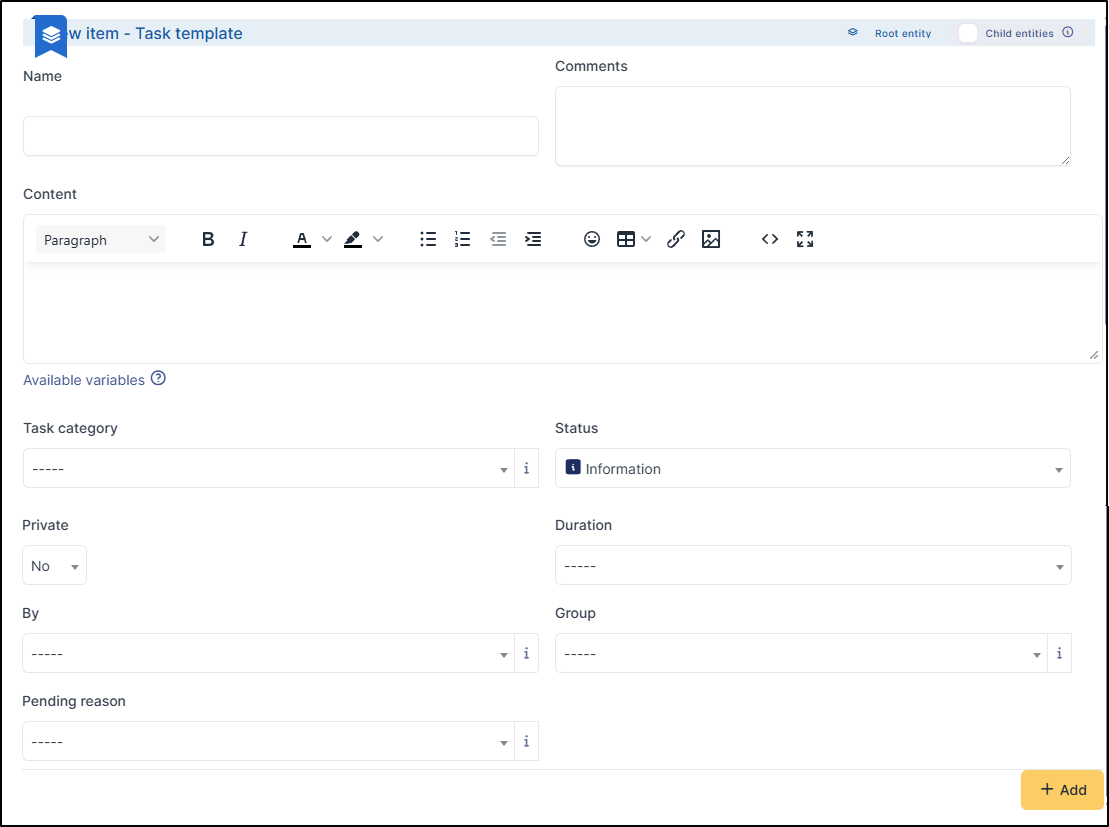
Templates simplify the process of creating a task (for recurring tasks, for example). When creating a task, simply select the appropriate template and the information will be filled in automatically.

#### Create a template

You can create a template by going to **`Setup`** > **`Dropdowns`** > **`Assistance`** > **`Task templates`** or by creating a task directly from a ticket, project or change.

<figure><img src="https://2965217165-files.gitbook.io/~/files/v0/b/gitbook-x-prod.appspot.com/o/spaces%2FBk8u0TPogHtiUd7DaQyf%2Fuploads%2Fgit-blob-0be976d33cc1a8d6c2b1c99af07205f7ff5d006d%2Fimage%20(1)%20(5).png?alt=media" alt=""><figcaption><p>Add followup template</p></figcaption></figure>

<figure><img src="https://2965217165-files.gitbook.io/~/files/v0/b/gitbook-x-prod.appspot.com/o/spaces%2FBk8u0TPogHtiUd7DaQyf%2Fuploads%2Fgit-blob-58c7ba9b32049059f629a0bce720b0bca7cea468%2Fcreation_task_template.png?alt=media" alt=""><figcaption><p>View followup template</p></figcaption></figure>

* **Name**: Will be appear in the list of templates
* **Comments**: Optionnal
* **Content**: You can use variables (click on available variable to see the list) and customise your content using the formatting bar
* **Task category**: Select the [task category](#task-categories) in thge dropdown list
* **Status**: add a status by default for your template (Information, To Do, Done)
* **Private**: Define whether this task is public or private[^1]
* **Duration**: Indicate the duration of the task (maximum 100 hours)
* **By**: The user assigned to the task. Select them from the dropdown list.
* **Group**: The group assigned to the task. Select them from the dropdown list.
* **Pending reason**: Indicate whether the ticket/change/project should be put on hold after the task is saved. See [pending reason](/athome-docs/assistance/tabs/pending-reason.md) for more information.

## Task categories

You can create task categories. These can then be exported for statistical purposes, for example.

#### Create a task category

You can create a category by going to **`Setup`** > **`Dropdowns`** > **`Assistance`** > **`Task categories`** or by creating a task directly from a ticket, project or change.<br>

<figure><img src="https://2965217165-files.gitbook.io/~/files/v0/b/gitbook-x-prod.appspot.com/o/spaces%2FBk8u0TPogHtiUd7DaQyf%2Fuploads%2Fgit-blob-5856b0b28edc47a8b390105f364161ffecfd4dda%2Fimage%20(2)%20(2).png?alt=media" alt=""><figcaption><p>Add category</p></figcaption></figure>

* Click on **`+ Add`**
* Enter the **name**
* Define whether this category is a subcategory of another category.
* Select **active yes**
* You can define whether this category should be added to the **knowledge base categories**

Once the category has been created, you can add a subcategory and add a translation.

[^1]: Only persons authorised to view private tasks (**`Administration`** > **`Profiles`** > *`My_profile`* > **`Assistance`** > **`Follow-ups/Tasks`**) will be able to view them.