> For the complete documentation index, see [llms.txt](https://athome-1.gitbook.io/athome-docs/llms.txt). Markdown versions of documentation pages are available by appending `.md` to page URLs; this page is available as [Markdown](https://athome-1.gitbook.io/athome-docs/assistance/recurrent-changes.md).
# Recurrent changes
## Overview
**Recurrent Changes** is a major new feature in GLPI 11 that automates the creation of change requests on a periodic basis.
## Why use it?
* Automatic creation of changes according to a defined frequency
* Use of predefined change templates
* Calendar management to comply with working hours
* Advance creation to enable planning
* Support for entities and recursion
* Simple activation/deactivation
## Prerequisites
**Required profile**: “Recurrent changes” right (read/write as needed)
**Access to templates**: “ITILTemplate” right to configure templates
## Configuring **recurrent changes**
### **Navigating the interface**
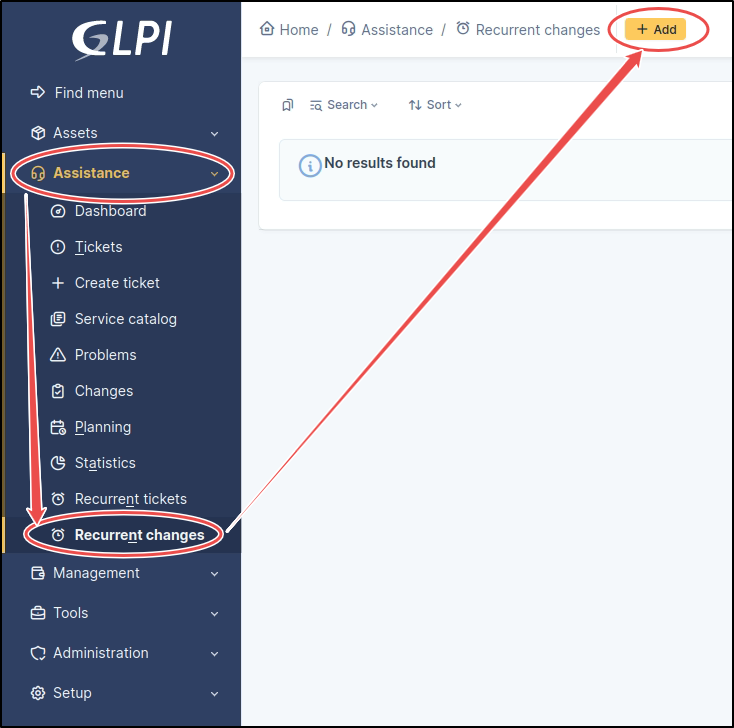
* In the main menu, click on **Support**
* Select **Recurrent changes** from the submenu
* On the Recurrent changes page, click **Add**
### **Basic configuration**
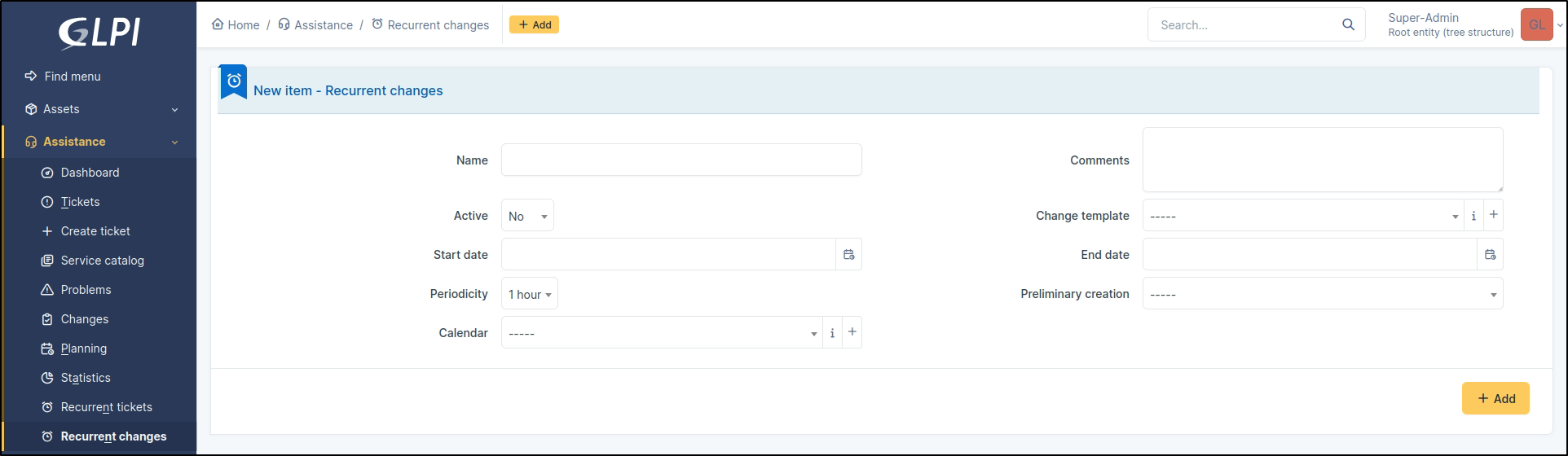
* **Name**: Descriptive name of the recurring change
* **Comment**: Description of the recurring change *(optional)*
* **Active**: Enable/Disable the creation of recurring changes
### **Adding the change template**
When creating the change, GLPI will use the configuration of the associated template. This is useful for configuring predefined, mandatory and hidden fields.
### **Time configuration**
**Start date**: Date from which to start the recurrence
**End date**: Automatic stop date *(optional)*
**Periodicity**: Waiting time between the creation of two recurring changes
**Preliminary creation**: Time limit for creating the change before the start date (up to 2 weeks) *(optional)*
**Calendar**: Restriction to working hours (optional)